


- Map your application code and Infrastructure as Code (IaC)
- Provide intelligent PR reviews
- Track code and infrastructure changes
- Map resource dependencies
Setup Guide
Configuration
Configuration
- Go to the Anyshift integrations page
- Navigate to the GitHub section
- Follow the setup instructions
Repository Access
Repository Access
Choose which repositories to connect: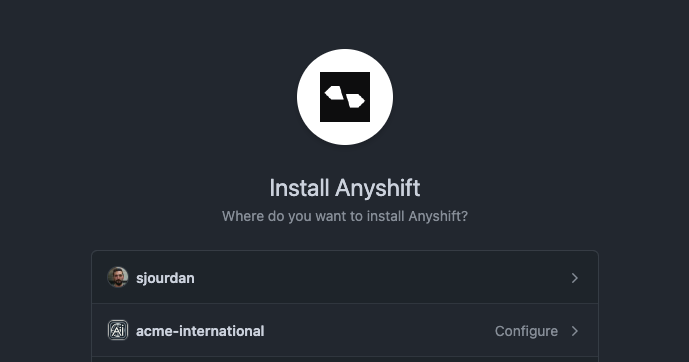
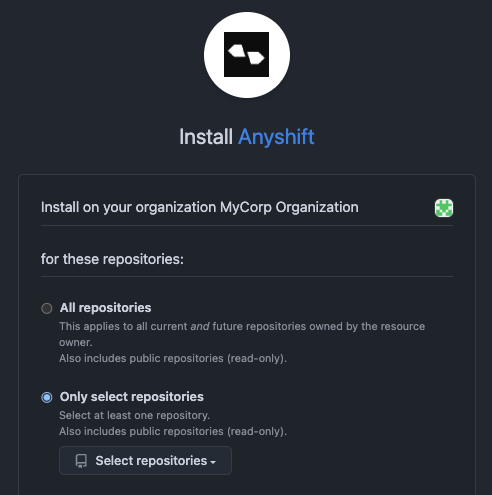
- Select your GitHub organization
- Choose repositories containing application or infrastructure code
Optional: Enable write mode (for Propose Fix)
Optional: Enable write mode (for Propose Fix)
The default install (
anyshift-app) is read-only. If you also want Annie to open pull requests via the Propose Fix feature, install the separate Anyshift Agentic App (anyshift-agentic-app).- In the Anyshift integrations page, click Enable write mode in the GitHub section
- Authorize the Agentic App on the same organization
- Pick the repositories Annie is allowed to write to
Features Enabled
Code Analysis
Deep understanding of your application code, infrastructure definitions, and dependencies
Change Impact
Comprehensive analysis of infrastructure changes and their effects
Integration Capabilities
- Code Understanding: Annie analyzes your application and infrastructure code to build a comprehensive knowledge base
- Change Detection: Monitors repository changes to keep insights current
- PR Integration: Provides automated reviews and suggestions
- Cross-Repository Analysis: Understands dependencies across multiple repositories
Try Annie Today
Start building your infrastructure knowledge graph and unlock intelligent infrastructure management.Create Account
Create your Anyshift account
Request Demo
See Annie’s knowledge graph in action