> ## Documentation Index
> Fetch the complete documentation index at: https://docs.anyshift.io/llms.txt
> Use this file to discover all available pages before exploring further.
# AWS Integration
> Connect Annie to your AWS account for real-time infrastructure mapping and monitoring.
# Overview
Connect your AWS account to Annie for real-time infrastructure mapping, monitoring, and intelligent insights. Annie ingests your AWS resources and relationships to build a knowledge graph of your cloud environment.
Annie is read-only: it uses `Describe*` / `List*` / `Get*` actions only, takes no write actions, and cannot modify your infrastructure. See the [IAM permissions reference](#iam-permissions-reference) for exactly what is read.
# Setup
The recommended path is a least-privilege managed policy attached to an assume role. For an IAM user instead, see [Alternative: IAM user](#alternative-iam-user).
Go to the [Anyshift integrations page](https://app.anyshift.io/integrations) and navigate to the AWS section.
Create the least-privilege managed policy Annie uses. The same policy is reused by the assume role and the IAM user options.
```hcl theme={null}
data "aws_iam_policy_document" "annie_readonly" {
statement {
sid = "AllowS3Metadata"
effect = "Allow"
actions = [
"s3:GetAccessPoint",
"s3:GetAccessPointPolicy",
"s3:GetBucketLocation",
"s3:GetBucketNotification",
"s3:GetEncryptionConfiguration",
"s3:GetMultiRegionAccessPoint",
"s3:GetMultiRegionAccessPointRoutes",
"s3:ListAccessPoints",
"s3:ListAllMyBuckets",
"s3:ListBucket",
"s3:ListMultiRegionAccessPoints",
]
resources = ["*"]
}
statement {
sid = "AllowComputeResources"
effect = "Allow"
actions = [
"ec2:Describe*",
"ecs:Describe*",
"ecs:List*",
"eks:DescribeAddon",
"eks:DescribeCluster",
"eks:DescribeNodegroup",
"eks:ListAddons",
"eks:ListClusters",
"eks:ListNodegroups",
"ecr:DescribeRepositories",
"ecr:GetRepositoryPolicy",
"lambda:GetAlias",
"lambda:GetEventSourceMapping",
"lambda:GetFunction",
"lambda:GetFunctionConfiguration",
"lambda:GetFunctionUrlConfig",
"lambda:List*",
"autoscaling:DescribeAutoScalingGroups",
"autoscaling:DescribePolicies",
"application-autoscaling:DescribeScalableTargets",
"application-autoscaling:DescribeScalingPolicies",
]
resources = ["*"]
}
statement {
sid = "AllowStorageResources"
effect = "Allow"
actions = [
"rds:Describe*",
"rds:ListTagsForResource",
"dynamodb:DescribeKinesisStreamingDestination",
"dynamodb:DescribeTable",
"dynamodb:GetResourcePolicy",
"dynamodb:ListTables",
"elasticache:DescribeCacheClusters",
"elasticache:DescribeCacheParameterGroups",
"elasticache:DescribeCacheSubnetGroups",
"elasticache:DescribeReplicationGroups",
"elasticache:DescribeServerlessCaches",
"backup:DescribeBackupVault",
"backup:DescribeRecoveryPoint",
"backup:GetBackupPlan",
"backup:GetBackupSelection",
"backup:GetBackupVaultAccessPolicy",
"backup:GetBackupVaultNotifications",
"backup:List*",
]
resources = ["*"]
}
statement {
sid = "AllowNetworkResources"
effect = "Allow"
actions = [
"elasticloadbalancing:Describe*",
"route53:GetHostedZone",
"route53:GetQueryLoggingConfig",
"route53:GetReusableDelegationSet",
"route53:List*",
"cloudfront:GetDistribution",
"cloudfront:GetDistributionConfig",
"cloudfront:ListDistributions",
"cloudfront:ListFunctions",
"cloudfront:ListTagsForResource",
]
resources = ["*"]
}
statement {
sid = "AllowIdentityResources"
effect = "Allow"
actions = [
"iam:Get*",
"iam:List*",
]
resources = ["*"]
}
statement {
sid = "AllowMonitoringResources"
effect = "Allow"
actions = [
"cloudwatch:DescribeAlarms",
"cloudwatch:GetMetricStatistics",
"cloudwatch:ListMetrics",
"logs:DescribeLogGroups",
"events:List*",
]
resources = ["*"]
}
statement {
sid = "AllowApplicationResources"
effect = "Allow"
actions = [
"sns:GetTopicAttributes",
"sns:ListSubscriptionsByTopic",
"sns:ListTopics",
"sqs:GetQueueAttributes",
"sqs:GetQueueUrl",
"sqs:ListDeadLetterSourceQueues",
"sqs:ListQueues",
"apigateway:GET",
"elasticmapreduce:DescribeStudio",
"elasticmapreduce:ListStudioSessionMappings",
"elasticmapreduce:ListStudios",
"kinesis:DescribeStreamSummary",
"kinesis:GetResourcePolicy",
"kinesis:ListStreams",
"kinesis:ListTagsForStream",
"states:DescribeStateMachine",
"states:ListStateMachines",
"states:ListTagsForResource",
]
resources = ["*"]
}
statement {
sid = "AllowKMS"
effect = "Allow"
actions = [
"kms:DescribeKey",
"kms:GetKeyPolicy",
"kms:GetKeyRotationStatus",
"kms:ListAliases",
"kms:ListKeyPolicies",
"kms:ListKeys",
"kms:ListResourceTags",
]
resources = ["*"]
}
statement {
sid = "AllowNotifications"
effect = "Allow"
actions = [
"codestar-notifications:DescribeNotificationRule",
"codestar-notifications:ListNotificationRules",
"notifications:ListEventRules",
"notifications:ListNotificationConfigurations",
]
resources = ["*"]
}
statement {
sid = "AllowAdditionalServices"
effect = "Allow"
actions = [
"acm:DescribeCertificate",
"acm:GetCertificate",
"acm:ListCertificates",
"acm:ListTagsForCertificate",
"athena:GetDataCatalog",
"athena:GetWorkGroup",
"athena:ListDataCatalogs",
"athena:ListDatabases",
"athena:ListEngineVersions",
"athena:ListWorkGroups",
"codebuild:BatchGetProjects",
"codebuild:ListProjects",
"codebuild:ListSourceCredentials",
"docdb-elastic:GetCluster",
"docdb-elastic:ListClusters",
"docdb-elastic:ListTagsForResource",
"emr-serverless:GetApplication",
"emr-serverless:ListApplications",
"firehose:DescribeDeliveryStream",
"firehose:ListDeliveryStreams",
"firehose:ListTagsForDeliveryStream",
"glue:GetConnection",
"glue:GetCrawler",
"glue:GetCrawlers",
"glue:GetDatabases",
"glue:GetJob",
"glue:GetJobs",
"glue:GetSecurityConfiguration",
"glue:GetTable",
"glue:GetTables",
"memorydb:DescribeACLs",
"memorydb:DescribeClusters",
"memorydb:DescribeParameterGroups",
"memorydb:DescribeSubnetGroups",
"memorydb:DescribeUsers",
"airflow:GetEnvironment",
"airflow:ListEnvironments",
"airflow:ListTagsForResource",
"oam:GetSink",
"oam:ListAttachedLinks",
"oam:ListLinks",
"oam:ListSinks",
"ram:GetResourceShareAssociations",
"ram:GetResourceShares",
"ram:ListPrincipals",
"ram:ListResources",
"sagemaker:DescribeNotebookInstance",
"sagemaker:DescribeNotebookInstanceLifecycleConfig",
"sagemaker:ListNotebookInstanceLifecycleConfigs",
"sagemaker:ListNotebookInstances",
"secretsmanager:DescribeSecret",
"secretsmanager:GetResourcePolicy",
"secretsmanager:ListSecrets",
"ses:DescribeConfigurationSet",
"ses:GetIdentityNotificationAttributes",
"ses:ListConfigurationSets",
"ses:ListIdentities",
"transfer:DescribeServer",
"transfer:ListServers",
"vpc-lattice:GetAccessLogSubscription",
"vpc-lattice:GetResourcePolicy",
"vpc-lattice:GetServiceNetworkVpcAssociation",
"vpc-lattice:ListAccessLogSubscriptions",
"vpc-lattice:ListServiceNetworkResourceAssociations",
"vpc-lattice:ListServiceNetworkServiceAssociations",
"vpc-lattice:ListServiceNetworkVpcAssociations",
"vpc-lattice:ListServiceNetworks",
"waf:GetWebACL",
"waf:ListIPSets",
"waf:ListRuleGroups",
"waf:ListRules",
"waf:ListWebACLs",
"waf-regional:GetWebACL",
"waf-regional:ListIPSets",
"waf-regional:ListResourcesForWebACL",
"waf-regional:ListRuleGroups",
"waf-regional:ListRules",
"waf-regional:ListWebACLs",
"wafv2:GetWebACLForResource",
"wafv2:List*",
]
resources = ["*"]
}
statement {
sid = "AllowCloudTrailLookup"
effect = "Allow"
actions = [
"cloudtrail:LookupEvents",
]
resources = ["*"]
}
}
resource "aws_iam_policy" "annie_readonly" {
name = "annie-readonly"
policy = data.aws_iam_policy_document.annie_readonly.json
}
```
To restrict which S3 buckets Annie can introspect, see [Restrict S3 to specific buckets](#restrict-s3-to-specific-buckets) before applying.
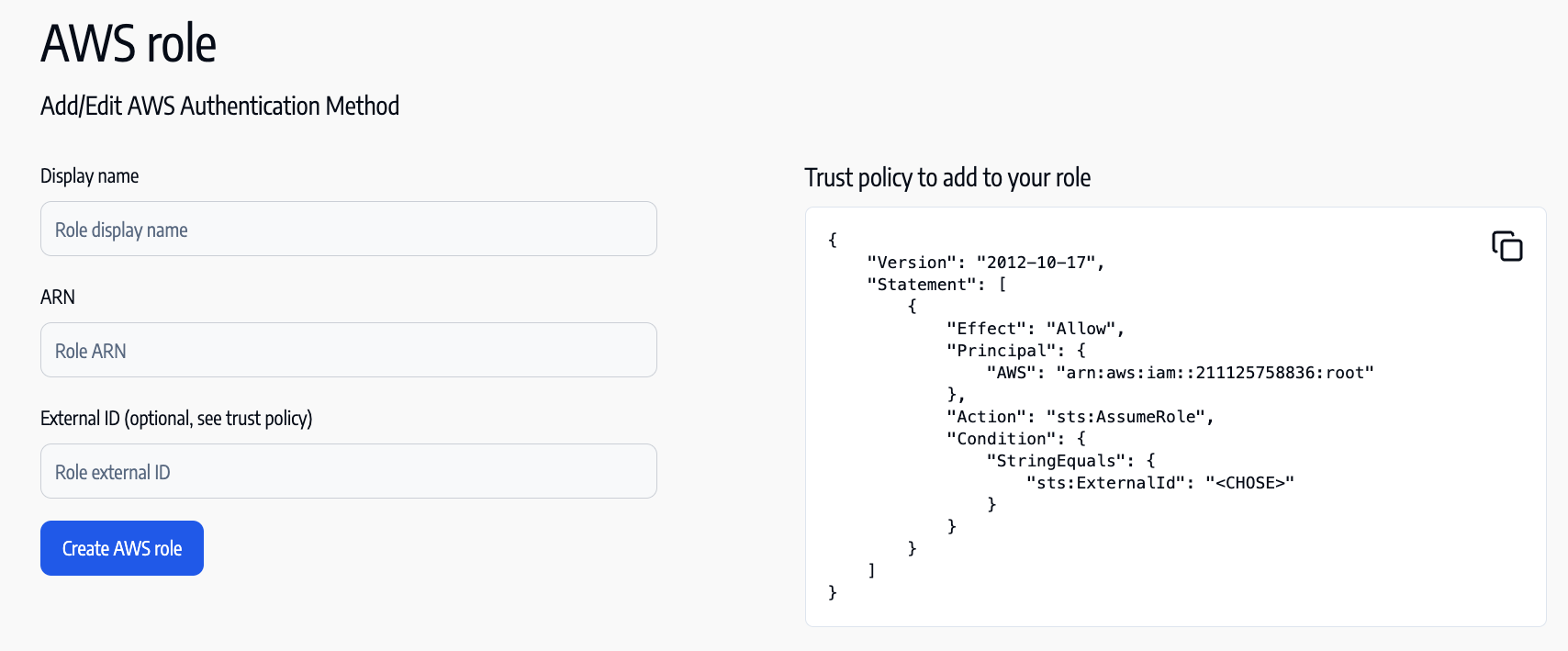
Create an assume role that trusts the Annie account (`211125758836`) and attach the `annie-readonly` policy.
**Using Terraform (recommended)**
```hcl theme={null}
resource "aws_iam_role" "annie_assume_role" {
name = "annie-assume-role"
assume_role_policy = jsonencode({
Version = "2012-10-17"
Statement = [
{
Effect = "Allow"
Principal = {
AWS = "arn:aws:iam::211125758836:root"
}
Action = "sts:AssumeRole"
Condition = {
StringEquals = {
"sts:ExternalId" = "replace_with_optional_external_id"
}
}
}
]
})
}
resource "aws_iam_role_policy_attachment" "annie_readonly" {
role = aws_iam_role.annie_assume_role.name
policy_arn = aws_iam_policy.annie_readonly.arn
}
```
**Using AWS Console**
* Navigate to IAM Roles and select **Create Role**.
* Choose **Another AWS account** and enter the **Account ID**: `211125758836`.
* Add an **External ID** (Optional: acts as a shared secret).
* Attach the **`annie-readonly`** policy created above.
* Complete the role creation process.
* Copy the **Role ARN** for the next step.
* Navigate to Anyshift Configuration and select **Add AWS Role**.
* Enter a descriptive **Display Name** (e.g., `"read_only_role_for_anyshift"`).
* Paste the **Role ARN** from the previous step.
* Enter the **External ID** (Optional).
* Save the configuration.
## Features enabled
Real-time visibility into your cloud infrastructure
Understand your infrastructure dependencies
## Reference
The `annie-readonly` policy grants only what Annie needs for the **resource graph** (bucket inventory and per-bucket metadata only: no object reads, no data-plane access):
* **S3:** bucket inventory and per-bucket metadata (location, default encryption, event notifications, access points, multi-region access points). No object content is read for the resource graph.
* **Compute, network, identity, monitoring, application, KMS, notifications, and other services:** `Describe*` / `List*` / `Get*` only.
* **No write actions.** No `kms:Decrypt`, no `secretsmanager:GetSecretValue` (only `secretsmanager:GetResourcePolicy` for resource policies, not secret material).
* **CloudTrail:** `cloudtrail:LookupEvents` only. This lets Annie pull recent AWS API activity (who changed what) directly through this read-only role, without deploying the [CloudTrail forwarder](/integration/aws/cloudtrail). It is read-only, returns only the last **90 days of management events**, and requires `Resource: "*"` (an AWS constraint: `LookupEvents` has no resource-level scoping). CloudTrail lookups are **per-region**: Annie always polls **US East (N. Virginia)** — where AWS records global-service events (IAM, STS, CloudFront, Route 53) — plus any additional regions we configure. Tell us which regions your workloads run in so we can include them; activity in regions we aren't polling won't appear.
To ingest **Terraform state files stored in S3**, an additional bucket-scoped grant is needed. See [Terraform state ingestion](#terraform-state-ingestion).
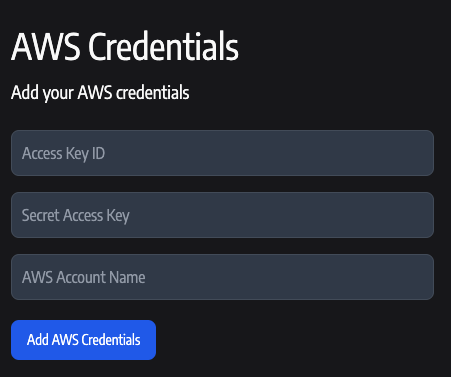
Use an IAM user instead of an assume role. Reuse the `annie-readonly` policy from the setup steps.
**Using Terraform (highly recommended)**
```hcl theme={null}
resource "aws_iam_user" "annie_user" {
name = "annie-readonly-user"
}
resource "aws_iam_access_key" "annie_access_key" {
user = aws_iam_user.annie_user.name
}
resource "aws_iam_user_policy_attachment" "annie_readonly" {
user = aws_iam_user.annie_user.name
policy_arn = aws_iam_policy.annie_readonly.arn
}
```
**Using AWS Console**
* Go to IAM → Users → Add User
* Enable Programmatic Access
* Attach the **`annie-readonly`** policy created in the setup steps.
* Save Access Key ID and Secret Access Key
**Configure in Anyshift**
* Enter the **Access Key ID** and **Secret Access Key** from the IAM user creation step.
* Provide a descriptive **AWS Account Name** label (e.g., `"read_only_user_for_anyshift"`).
Use this variant to introspect only certain S3 buckets. Bucket enumeration (`s3:ListAllMyBuckets`, `s3:GetBucketLocation`) cannot be resource-scoped at the IAM level: every bucket name and region stays visible. Per-bucket metadata (encryption, notifications) is read only for the buckets you list.
Keep the `data "aws_iam_policy_document" "annie_readonly"` block from setup unchanged. Add the blocks below in the same Terraform configuration, and change the `policy` argument on `aws_iam_policy.annie_readonly` from `data.aws_iam_policy_document.annie_readonly.json` to `data.aws_iam_policy_document.annie_readonly_bucket_scoped.json`.
```hcl theme={null}
data "aws_iam_policy_document" "annie_s3_scoped_override" {
statement {
sid = "AllowS3Metadata"
effect = "Allow"
actions = [
"s3:ListAllMyBuckets",
"s3:GetBucketLocation",
"s3:ListBucket",
]
resources = ["*"]
}
statement {
sid = "AllowS3IntrospectionScoped"
effect = "Allow"
actions = [
"s3:GetEncryptionConfiguration",
"s3:GetBucketNotification",
]
resources = [
"arn:aws:s3:::your-bucket-name-1",
"arn:aws:s3:::your-bucket-name-2",
]
}
}
data "aws_iam_policy_document" "annie_readonly_bucket_scoped" {
source_policy_documents = [data.aws_iam_policy_document.annie_readonly.json]
override_policy_documents = [data.aws_iam_policy_document.annie_s3_scoped_override.json]
}
```
The `override_policy_documents` argument replaces the original `AllowS3Metadata` statement (matched by `sid`) and appends the new `AllowS3IntrospectionScoped` statement.
**Tradeoff:** buckets not listed in `AllowS3IntrospectionScoped` appear in the Annie graph as bare entries (name + region) without encryption or notification attributes. S3 access points and multi-region access points are not bucket-scopable in IAM and are not introspected in this variant.
If you store Terraform state in S3 and want Annie to ingest it (drift detection, IaC-to-live mapping), grant the same role/user `s3:GetObject` and `s3:ListBucket` on your tfstate bucket(s) in addition to the policy above. Scope tightly to the buckets that hold state: Annie reads only the keys you tell it to ingest, and only those grants are needed.
```hcl theme={null}
data "aws_iam_policy_document" "annie_tfstate_read" {
statement {
sid = "AllowTfstateBucketList"
effect = "Allow"
actions = ["s3:ListBucket"]
resources = [
"arn:aws:s3:::your-tfstate-bucket",
]
}
statement {
sid = "AllowTfstateObjectRead"
effect = "Allow"
actions = ["s3:GetObject"]
resources = [
"arn:aws:s3:::your-tfstate-bucket/*",
]
}
}
resource "aws_iam_policy" "annie_tfstate_read" {
name = "annie-tfstate-read"
policy = data.aws_iam_policy_document.annie_tfstate_read.json
}
```
Attach `aws_iam_policy.annie_tfstate_read.arn` to the same role or user using the same `aws_iam_role_policy_attachment` / `aws_iam_user_policy_attachment` pattern shown above. If your state is encrypted with a customer-managed KMS key, also grant `kms:Decrypt` on that key's ARN.
## Try Annie Today
Start building your infrastructure knowledge graph and unlock intelligent infrastructure management.
Create your Anyshift account
See Annie's knowledge graph in action