> ## Documentation Index
> Fetch the complete documentation index at: https://docs.anyshift.io/llms.txt
> Use this file to discover all available pages before exploring further.
# Infrastructure as Code
> Anyshift is built on IaC. Annie correlates your Terraform code, Terraform state, and live infrastructure so you always know what you declared, what you stored, and what is actually running.
## Built on Infrastructure as Code
Anyshift doesn't just read your cloud. It reads your **code**, your **state**, and your **live infrastructure**, then correlates the three so you can see where they agree and where they've drifted.
 Declared resources are linked to the state that instantiated them, and state entries are linked to the live resources they manage. That's how Annie answers questions that span layers: *"Which module deployed this pod?"*, *"What code manages this RDS instance?"*, *"Which resources are running without any Terraform backing?"*
The same model applies to Kubernetes: declared manifests (or Helm charts) → live cluster state, streamed by the Anyshift agent.
## See the graph
Annie can also draw the graph. Ask *"map our cluster"* or *"diagram the dependencies of the payment service"* and she renders the live topology from the [knowledge graph](/pages/overview/knowledge_graph) as a diagram you can read at a glance.
Declared resources are linked to the state that instantiated them, and state entries are linked to the live resources they manage. That's how Annie answers questions that span layers: *"Which module deployed this pod?"*, *"What code manages this RDS instance?"*, *"Which resources are running without any Terraform backing?"*
The same model applies to Kubernetes: declared manifests (or Helm charts) → live cluster state, streamed by the Anyshift agent.
## See the graph
Annie can also draw the graph. Ask *"map our cluster"* or *"diagram the dependencies of the payment service"* and she renders the live topology from the [knowledge graph](/pages/overview/knowledge_graph) as a diagram you can read at a glance.
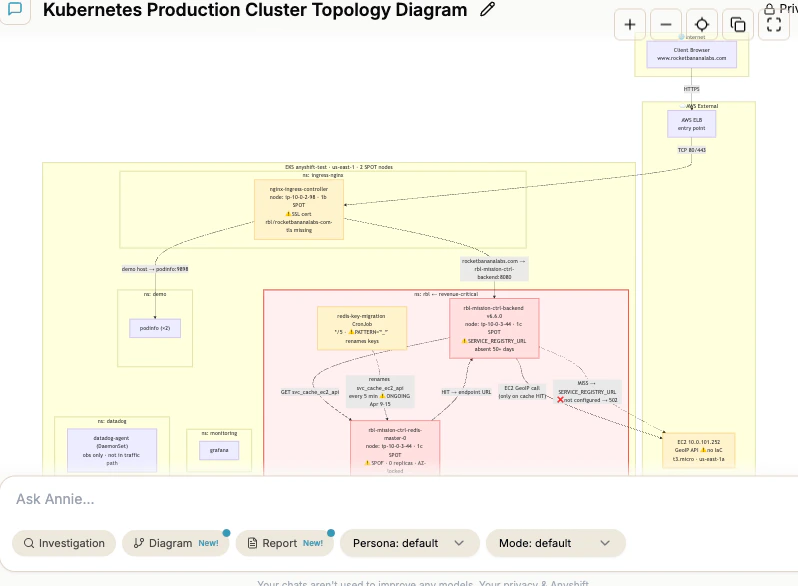 The diagram comes from the same graph that powers [Annie Knowledge](/pages/product/annie_knowledge), so it shows what is *actually running* right now: real resource names, live dependencies, and gaps like a missing config or an unmanaged instance. No stale wiki sketch.
### Working with diagrams
Zoom, pan, and open any diagram fullscreen to follow a dependency chain across layers.
Every diagram lands in [**Artifacts → Diagrams**](https://app.anyshift.io/artifacts), so you can reopen and share it later.
Diagrams are plain [Mermaid](https://mermaid.js.org). Copy the source and paste it into GitHub, Notion, or any Mermaid-compatible tool.
Ask for a diagram in a [conversation](/pages/product/annie_knowledge), and dig deeper with a follow-up question right where you are.
## What You Can Ask Annie
* *"Which Terraform module created this EC2 instance?"*
* *"Show me all resources defined in the networking module"*
* *"What variables does this state file use?"*
* *"What resources were modified outside of Terraform this week?"*
* *"Which live resources have no Terraform backing?"*
* *"Are my declared replicas matching the pods actually running?"*
See the [Drift Detection](/pages/iac/drift_detection) page for more.
* *"What breaks if I destroy this module?"*
* *"Which services depend on this security group?"*
* *"If I change this variable, what resources are affected?"*
## Explore the IaC Section
How Annie ingests Terraform code and state, and what she does with them.
How Annie streams live cluster state and ties it to your declared K8s manifests.
Find the gap between what you declared and what's actually running.
How all of this connects under the hood.
The diagram comes from the same graph that powers [Annie Knowledge](/pages/product/annie_knowledge), so it shows what is *actually running* right now: real resource names, live dependencies, and gaps like a missing config or an unmanaged instance. No stale wiki sketch.
### Working with diagrams
Zoom, pan, and open any diagram fullscreen to follow a dependency chain across layers.
Every diagram lands in [**Artifacts → Diagrams**](https://app.anyshift.io/artifacts), so you can reopen and share it later.
Diagrams are plain [Mermaid](https://mermaid.js.org). Copy the source and paste it into GitHub, Notion, or any Mermaid-compatible tool.
Ask for a diagram in a [conversation](/pages/product/annie_knowledge), and dig deeper with a follow-up question right where you are.
## What You Can Ask Annie
* *"Which Terraform module created this EC2 instance?"*
* *"Show me all resources defined in the networking module"*
* *"What variables does this state file use?"*
* *"What resources were modified outside of Terraform this week?"*
* *"Which live resources have no Terraform backing?"*
* *"Are my declared replicas matching the pods actually running?"*
See the [Drift Detection](/pages/iac/drift_detection) page for more.
* *"What breaks if I destroy this module?"*
* *"Which services depend on this security group?"*
* *"If I change this variable, what resources are affected?"*
## Explore the IaC Section
How Annie ingests Terraform code and state, and what she does with them.
How Annie streams live cluster state and ties it to your declared K8s manifests.
Find the gap between what you declared and what's actually running.
How all of this connects under the hood.